


Zeo Fast Multi Stop Route Plan
4.5763.00 Reviews
App Specs
- Version
- 30.9
- Updated On
- License
- Free
- Downloads
- 1,000,000+
- Developer
- Zeo Business
- Categories
- Maps & Navigation
- Platform
- Android
Screenshots
 Analysis by AppCompare
I tend to notice route-planning apps most on the days when a simple trip turns into a string of stops. That is the problem Zeo Fast Multi Stop Route Plan is built to address: it helps arrange several destinations into a practical route rather than leaving me to guess the order from one map search at a time. It is a navigation app from Zeo Business, and I find its focus especially useful when the day involves repeated drop-offs, collections, or errands across town.
Start with the list, not the first turn
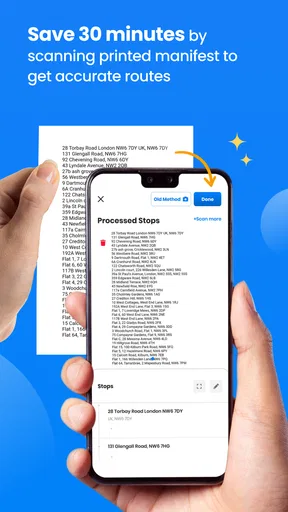
Before opening a route planner, I like to gather the full list of places I need to visit. That small bit of preparation matters here: a route can only be as useful as its stops. I check that each address is specific enough to distinguish the right entrance or building, especially in a large complex, then enter the destinations and review the proposed order before setting off. It is worth catching a mistyped address while I am still parked, not after I have driven across town.
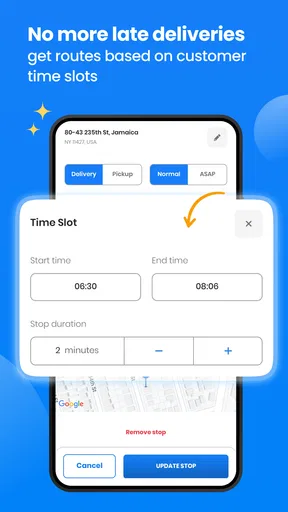
That workflow is more useful than repeatedly asking a standard map app for directions to the next place. A conventional navigation app is often the better choice for a single destination or a trip where I already know the order. For a day with many stops, Zeo’s route-planning focus can reduce the mental work of deciding what comes next. I still treat the result as a plan to check, not an instruction to follow blindly: road closures, access restrictions, and a customer’s preferred arrival window can outweigh the shortest-looking sequence.
Getting Started with Zeo Fast Multi Stop Route Plan
First things first, downloading and installing the app is a breeze. Available on both Android and iOS, it’s just a quick hop to the app store, and you’re ready to roll. When you launch the app, you’re greeted with a clean, straightforward interface that doesn’t overcomplicate things—something I truly appreciate!
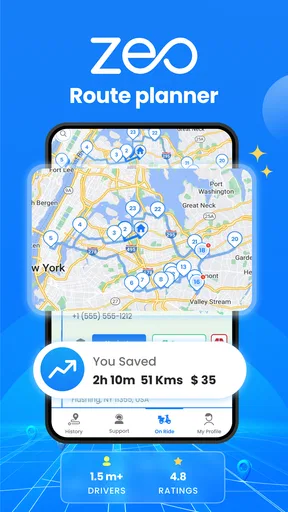
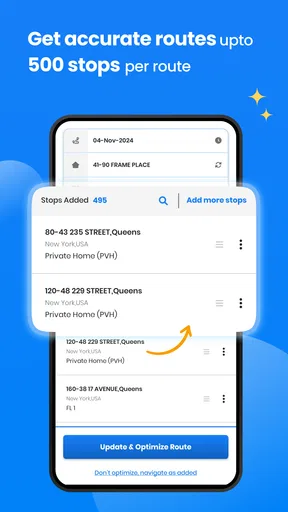
Setting up your routes is intuitive. You simply input all your stops, and Zeo Fast Multi Stop Route Plan does the heavy lifting. It calculates the optimal order and route to save you both time and fuel. I found this particularly handy when I had a list of deliveries spanning the city. Who wouldn’t want to shave off some hours from a hectic schedule?
Features That Stand Out
One of the features that caught my eye was the real-time traffic updates. The app integrates seamlessly with live traffic data, ensuring you’re always on the fastest route. I remember a day when traffic was unexpectedly heavy, and the app rerouted me like a pro, saving me from sitting in a jam.
Another neat feature is the app’s ability to handle multiple routes at once. If you’re managing several drivers or just planning a busy day, you can easily switch between different routes. Plus, it offers offline maps, which came in handy when I ventured into areas with spotty network coverage.
Worth Reading Before You Choose

EA SPORTS FC Mobile 26 Is a Bigger Football Game, but It Takes Time

Flipboard Shows What News Apps Must Do Beyond the Feed

Switching to Android Auto Means Rethinking Your Driving Routine

Google Calendar Makes a Crowded Week Easier to Manage

Ludo King Makes the Most of the Minutes Between Plans

Baby Panda World Brings Quick Play to Modern Phones, but Its Game Library Feels Busy
Putting It to the Test
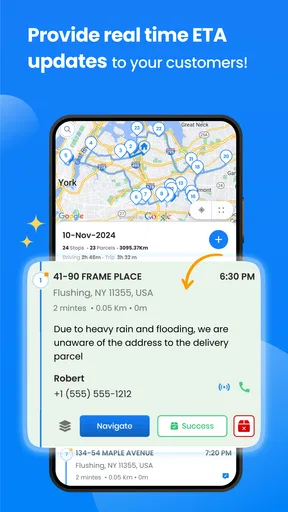
So, how does it perform in real-world scenarios? Pretty darn well. I tested it on a busy Saturday while running errands across town. The app not only optimized my route but also provided estimated arrival times that were impressively accurate. It even factored in different modes of transport, which is a nice touch if you’re switching between driving and biking.
From morning dispatch to the last doorstep
A realistic delivery day shows where route ordering helps most. Imagine a driver starting with a van full of parcels, a list of addresses spread across several neighborhoods, and a fixed time to finish. Rather than driving to the nearest address each time and then doubling back, I would enter the complete set first, check that the suggested sequence makes sense geographically, and begin once the plan looks workable. The value is not only fewer miles; it is also fewer decisions to make while trying to keep the day moving.
For a small business, that first review is a useful handoff between whoever prepares the jobs and whoever drives them. The person assigning stops can spot an address that belongs in a different area or note a delivery that must happen earlier. The driver then starts with a more coherent order instead of inheriting a pile of destinations and having to improvise. I would still communicate any time-sensitive or access-specific instructions separately, because a route sequence alone cannot convey every detail of a delivery.
On a personal day, the same approach works for errands that have different purposes: a return, a collection, and a grocery stop. I would put the fixed destination first in my planning, then see how the other stops fit around it. If one location has limited opening hours, I would preserve that constraint rather than accept an efficient-looking loop that arrives too late. The planner is most helpful when I use it to organize the flexible parts of the day around the parts that are not flexible.
What to check before you hand over the route
When more than one person is involved, route planning is only one part of coordination. I would confirm who is responsible for each stop and make sure the route being followed is the intended one before a driver leaves. Switching between routes can be useful when managing a busy day, but it also creates a simple human risk: someone may open the wrong plan or assume a stop belongs to their run. A brief check of the first few destinations can prevent that kind of avoidable confusion.
There is another practical trade-off with multi-stop work. The mathematically efficient order may not match the order a team prefers for loading, handling fragile items, or meeting a customer’s schedule. I would group or prepare parcels with the planned sequence in mind where possible, while keeping special handling needs ahead of convenience. A route planner can help with where to go; the person organizing the load still has to make sure the next item is reachable without unpacking half the vehicle.
The traffic and offline-map tools address different problems, so I would not treat them as interchangeable. Live traffic is useful when the connection is available and conditions change; offline maps are reassuring when reception drops. If I expect weak coverage, I would prepare the route before entering that area and avoid assuming every online update will arrive there. That is a small habit, but it makes an offline option more useful than discovering a coverage gap halfway through navigation.
What happens when a stop changes? In the sort of day where a customer cancels or a location is closed, I would remove or revise that destination as soon as it is practical, then check the new order before continuing. The app’s route updates can take some of the recalculation off my hands, but I would still verify the next turn and destination. A changed plan is also a handoff moment: if somebody else is expecting the driver, I would let them know rather than assume the updated route communicates the change.
How it fits beside ordinary navigation apps
For a single commute, a familiar map app is usually simpler: enter the destination, follow the directions, and make a separate search if plans change. Zeo makes more sense when the central problem is the order of several stops. Its appeal is therefore quite specific, not that it replaces every navigation tool. I would choose it for a delivery run or a packed errand list, then rely on a basic navigation app when I only need to get to one place or want a familiar map-first experience.
It is also a better fit for someone who repeats multi-stop work than for a person who makes an occasional short outing. A courier, field worker, or sales representative can benefit from planning a run as a whole; someone visiting two nearby shops may find that typing every stop takes longer than simply choosing the next one. The break-even point depends on how many destinations and how much backtracking the unplanned route would create, not on a magic number of stops.
I would skip it if my priority were turn-by-turn navigation to one address, or if I needed a route planner to manage complex appointment constraints without checking them myself. Likewise, it is not a substitute for confirming road access, parking, building entry, or a recipient’s availability. Those details can change the best route in ways a sequence of map destinations cannot resolve on its own.
What the app costs and who should try it
Zeo Fast Multi Stop Route Plan is free to install, with optional in-app purchases listed from $1.99 to $200.00 per item. I would start with the free experience and only consider a purchase if I had a clear work need that justified it. Since optional spending can vary substantially, I would check the in-app purchase details before committing rather than assume every useful capability is included at no cost.
The app is rated for Everyone, has a 4.5 average from around 34,000 ratings, and has passed one million installs. It first appeared on February 26, 2020; version 28.6 supports Android 5.0 and later. Those basics make it accessible to many Android users, though I would still check that the device I plan to use is supported and that the screen is comfortable to read in a vehicle mount.
For someone deciding whether to try it, the key question is how often a day includes several destinations whose order is flexible. If that happens regularly, a route planner can save attention as well as driving. If it is rare, a standard map app may be enough. I would also consider whether the person driving will be the one entering the stops: fewer handoffs usually mean fewer address mistakes, while a dispatcher-to-driver setup benefits from a quick check that both people are working from the same plan.
What should I do if I lose reception? The offline maps are useful in areas with spotty coverage, but I would prepare the route while connected and avoid relying on live traffic updates where the network is unavailable. Can I change the plan after starting? The route can adjust when a stop becomes unavailable, but I would review the revised sequence and communicate important changes to anyone waiting for a delivery. Is it suitable for a one-off trip? It can be, but for a single destination the extra planning is unlikely to offer much advantage over ordinary navigation.
One final habit improves the result: leave a little room in the plan for real life. A route that looks efficient on screen can still meet a locked gate, a slow handoff, or a full parking area. I use the suggested order to reduce avoidable backtracking, then let actual conditions and promised timings decide when a small detour is sensible. That balance is what makes a multi-stop tool practical rather than rigid.
What really impressed me was the app’s efficiency in updating routes on the fly. A couple of my stops were closed, and the app adjusted my route without any fuss. It’s like having a personal navigator who knows exactly what you need.
Who Is It For?
If you’re someone who regularly deals with logistics, whether for work or personal chores, Zeo Fast Multi Stop Route Plan is a game-changer. Delivery drivers, sales reps, or even busy parents juggling school drop-offs and grocery runs will find it invaluable.
The app is designed to be user-friendly, which means you don’t need to be a tech whiz to make the most of it. With just a few taps, you’re set to conquer the day like a pro.
Final Thoughts
In a world where time is of the essence, having a tool like Zeo Fast Multi Stop Route Plan is a lifesaver. It’s not just about getting from point A to B; it’s about making every journey as efficient as possible. With its smart features and easy-to-navigate interface, it’s a worthy addition to your app arsenal.
So, if you’re ready to streamline your routes and free up some precious time, give Zeo a try. Trust me, once you’ve experienced the convenience, you won’t want to go back to the old ways of planning your day.
Pros
- Efficient route optimization tool.
- Supports multiple stops seamlessly.
- User-friendly interface design.
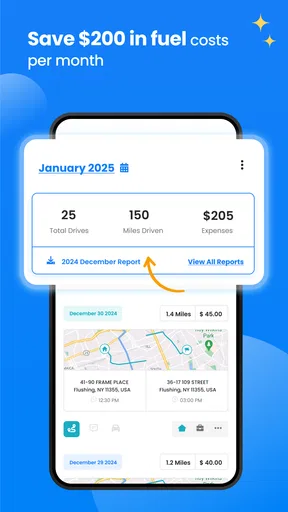
- Saves time and fuel costs.
- Integrates with map apps easily.
Cons
- Requires internet for best results.
- Limited features in free version.
- Occasional slow performance.
- Ads can be intrusive at times.
- Some users report minor bugs.
FAQs for Zeo Fast Multi Stop Route Plan
What is the primary function of Zeo Fast Multi Stop Route Plan?
Zeo Fast Multi Stop Route Plan is designed to optimize travel routes for users who need to stop at multiple locations. It calculates the most efficient path, minimizing travel time and fuel consumption. This app is especially useful for delivery drivers, salespeople, or anyone who needs to manage multiple destinations efficiently.
Is Zeo Fast Multi Stop Route Plan available on both Android and iOS?
Yes, Zeo Fast Multi Stop Route Plan is available for download on both Android and iOS platforms. Users can easily find it on Google Play Store and Apple App Store. The app provides a seamless experience on both operating systems, ensuring accessibility for a wide range of devices.
Does Zeo Fast Multi Stop Route Plan support offline use?
Zeo Fast Multi Stop Route Plan primarily requires an internet connection to calculate and update routes in real-time. However, once a route has been downloaded, users can access it offline. It's advisable to have a stable connection to ensure the app can provide the most accurate and updated routes.
Can I customize my routes in Zeo Fast Multi Stop Route Plan?
Yes, Zeo Fast Multi Stop Route Plan allows users to customize their routes by adding or removing stops and changing the order of visits. The app provides flexibility to accommodate last-minute changes and preferences, ensuring that users can easily adjust their plans as needed.
Is there a limit to the number of stops I can add in Zeo Fast Multi Stop Route Plan?
Zeo Fast Multi Stop Route Plan supports a large number of stops, making it ideal for complex itineraries. While there's no strict limit, very high numbers of stops might affect performance or require a premium version. Users should check the app's specific conditions or upgrade options for extensive route planning.


